
Every moment your guests capture, in one private gallery.
Guests scan a QR code on their table and share their photos and videos. There's no app and no sign-up. From 9am the morning after, your gallery is ready to view and download.
- Ready the moment you book
- Unlimited photos and videos
- Works on any iPhone or Android


Don't lose the photos from your guests.
Your guests will take hundreds of photos and videos on the day. Most stay on their phones and never reach you. The Guest Gallery gathers every one of them in one private gallery.
Three steps, no fuss
- Guests scan the QR codeon the table cards, with their phone camera
- Their photos go straight to youevery photo and video, into one private gallery
- You open it the morning afterand see your day through your guests' eyes
Book online
Choose your package and pay by card. Your gallery is created straight away, with your QR codes ready to download.
Print your QR cards
Print the table cards at home or at a local printer, or add the QR code to your own signs. Guests simply scan it with their phone camera.
Open your gallery
Your gallery is ready to view from 9am the morning after your wedding. Browse, favourite and download everything your guests shared.


The ceremony, the speeches and the evening, all taken on guests' phones.
Your wedding, seen from every table
On the day, you’ll be in the middle of it all. You can’t see everything, and nobody expects you to. Your guests will, though, and they’ll have their phones out.


Without The Guest Gallery, most of these stay on your guests’ phones. With it, they’re all yours.
Everything in one place, from the day you book
You get your own private page, opened with your PIN. Here is what it looks like on your phone.


Every photo, in the order it happened
The gallery reads the time each photo and video was taken, straight from the guest's phone. So your gallery runs from the first confetti shot to the last dance, without you sorting a thing. Even photos shared days later slot into the right place.
- 1:42pmJust married
- 2:05pmConfetti
- 5:30pmThe speeches
- 9:48pmOn the dance floor
Grouped by the hour in your gallery, and named by time in your downloads, so they stay in order on your computer too.
Times come from each guest's phone, so they rely on its clock being set correctly.
The views from every table, kept together
Your photographer and filmmaker capture the day beautifully. Meanwhile, your guests see moments from angles nobody else does. The Guest Gallery brings those together, so nothing stays lost on someone's phone.
Two extras your guests will love

The scavenger hunt
Guests get a list of fun shots to find, such as "the best dance move" or "a selfie with the couple". A progress bar shows how many they've ticked off. It gets everyone snapping, and you end up with the moments you'd never think to ask for.
Use our twelve prompts, or write your own.


Guest video messages
Guests record a short message for you, straight from the page. Think of it as a guest book you can watch back. Messages are kept in their own folder, so they're easy to find when the day is done.
Up to 60 seconds each, recorded on their own phone.
Better than disposable cameras
A disposable camera on every table soon adds up, and half the photos come back blurred or blank. Your guests already carry a better camera in their pocket. The Guest Gallery simply gathers what they take, in full quality, all in one place.

Made by an award-winning wedding filmmaker
I’m Adam, a wedding filmmaker. Couples kept telling me the same thing: their guests took hundreds of photos, but most were never sent.
So I built The Guest Gallery, to gather every photo and video in one private place. I look after it myself, from County Durham.
The Wedding Industry Awards, 2026
In their words
I think the idea is excellent and the layout is easy to use with some nice features.
The scavenger hunt was good and nice you could change it, which suited us. Loved the fact you could choose if guests can see the images. The goal was a nice touch too. All in all it's a good bit of kit that I feel is worth keeping.
Used The Guest Gallery? I’d love to hear how it went. Leave a review
Choose your gallery
The Gallery
- Unlimited photos and videos
- Full-size downloads
- Private gallery with PIN
- QR codes and printable table cards
- Email updates as guests upload
- 30 days to view and download
The Full Story
- Everything in The Gallery
- 90 days to view and download
- Scavenger hunt with progress bar
- Guest video messages
- Your own hunt prompts

Add a voice guest book
Guests scan a QR code and leave a spoken message on their own phone. A few days later, guests can leave a follow-up message too. You get every message as an MP3, plus one keepsake file.
See how Guest Voices works at guestvoices.me →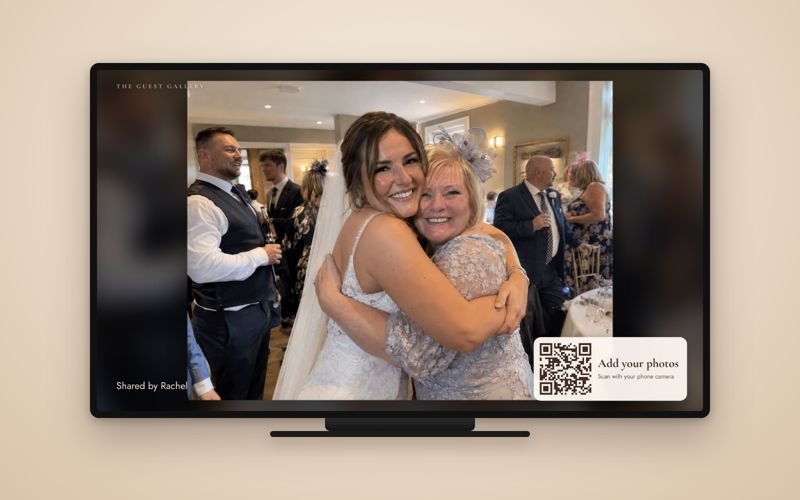
Your guests' photos, on the big screen
Guests' photos play on a TV at your wedding, moments after they are taken. A QR code in the corner invites everyone else to add theirs.
Photos show straight away. If you would rather one did not, hide it from your phone and it leaves the screen within seconds.
Works on a smart TV, or a laptop plugged into the TV.
Offer prices apply to bookings made by 31 December 2026, for weddings on any date.
One-off payment, no subscription. Free date changes.
Buying for a couple? Give The Guest Gallery as a gift
Planning a birthday party? It works for those too · Corporate events too
Questions
Do guests need to download an app?
No. They scan the QR code with their phone camera and upload straight from the web page. There's no app and no account to create.
Does it work on iPhone and Android?
Yes. It works in the normal browser on any modern iPhone or Android phone.
Is there a limit on photos, videos or guests?
No. Every package includes unlimited uploads from as many guests as you like.
Can guests see each other's photos?
Only if you want them to. Your gallery is private, behind your link and PIN. You can switch on sharing, and guests then see everyone's photos and videos from the morning after. Video messages always stay just for you.
What if the venue has poor signal?
Uploads pick up where they left off if the signal drops. Guests can also add theirs later, from home, with the same QR code. Your page has a ready-made message with the link, to send everyone the day after.
How can we help guests with no signal?
Ask your venue for its guest Wi-Fi, and add the details to your signs or table cards. Mention the gallery in your wedding invitations or welcome message, so guests know to share later too.
When can we see everything?
Your gallery opens at 9am the morning after your wedding, so the late-night uploads are already in.
Can guests keep uploading after the wedding?
Yes. They can add photos and videos until your gallery closes. That's 30 days after the wedding with The Gallery, or 90 days with The Full Story.
Do we have to sort the photos?
No. The gallery reads the time each photo and video was taken from the guest's phone, so everything appears in the order it happened. Late uploads slot into the right place, and downloads are named by time. This relies on the clock on each guest's phone, so a phone set to the wrong date or time will show its photos out of place.
What quality are the files?
Photos arrive at full size, not the compressed versions sent over messaging apps. Videos arrive exactly as each guest's phone sends them.
How long is the gallery open?
The Gallery stays open for 30 days after your wedding, and The Full Story for 90 days. I email you before it closes, so you have time to download everything.
Can we keep the gallery open for longer?
Yes. Add an extra year for £20 when you book, or from your gallery while it is open. After that, each further year is £15. Guests can keep adding to it during that time.
What happens when the gallery closes?
The gallery and its links stop working. I keep a backup of the original files for 6 months, in case you need anything, and then delete it.
How do we download everything?
Download single photos and videos, or the whole gallery in one go. Large galleries are split into a few zip files, so they download reliably.
What do we get to put on the tables?
Printable QR table cards, plus the QR code on its own as a transparent image. Add it to your own signs, menus or welcome board.
Can we match the QR code to our wedding colours?
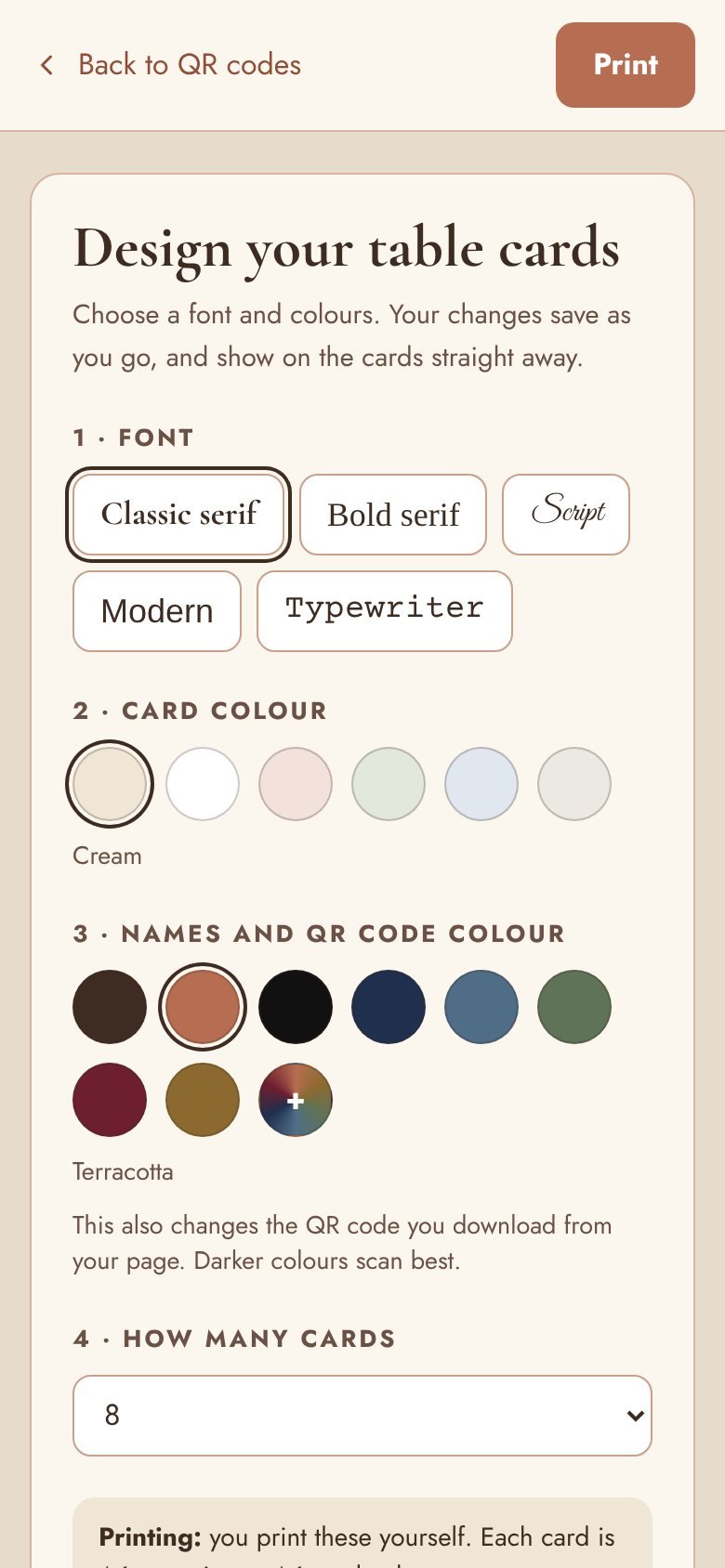
Yes. Choose the QR code colour and the table card font on your page. You can also download the code on its own, to add to your own design.
Do guests have to give their name or email?
No. Guests can add their name if they like, so you know who took what. Guests are never asked for an email address.
Can we see who uploaded each photo?
Yes, when the guest has added their name. You can filter the gallery by guest, too.
Can a photo be removed?
Yes. Just email me with the couple's names, and I will remove it for you.
Can guests' photos play on a TV at the wedding?
Yes, with the TV slideshow add-on for £20. Open your TV link on the venue's smart TV, or on a laptop plugged into the TV. Guests' photos then play full screen as they arrive, with a QR code so others can join in.
Can we stop a photo appearing on the TV?
Yes. Photos appear straight away, but you can hide any of them from your phone. It leaves the screen within a few seconds and stays in your gallery.
What does the TV slideshow need?
A TV with a web browser, which most smart TVs have, or a laptop plugged into the TV with an HDMI cable. It also needs internet, through the venue's wifi or a phone hotspot.
Can I buy The Guest Gallery as a gift?
Yes. Choose a package on the gift page, and I email you a gift card with a code. The couple use the code when they book, for a wedding on any date.
Do you post the table cards?
No. You print them yourself, at home on card or at a local printer. They are A6, and you choose the font and how many you need. You can also download the QR code to add to your own stationery.
When should we book?
Any time before the wedding. Your QR codes are ready as soon as you pay, so most couples book when they design their stationery.
Can guests leave voice messages too?
Yes, with Guest Voices, my audio guest book. Tick it when you book. Guests scan its own QR code and record a spoken message on their phone, with no app.
Does The Guest Gallery work anywhere in the UK?
Yes. Everything is online, so it works at any venue in the UK. Guests just need a phone and some signal or Wi-Fi, and can upload later from home.
Can we change the wedding date?
Yes. Just let me know, and I will move your gallery dates at no extra cost.
Can our photographer or videographer use the guest footage?
The gallery is yours. You can download anything and share it with your suppliers whenever you like.